
Event Ticketing Platform with Seat Maps
An event ticketing platform where organisers publish events with reserved seating or general admission, buyers pick seats on a live map, and payouts follow each event automatically.
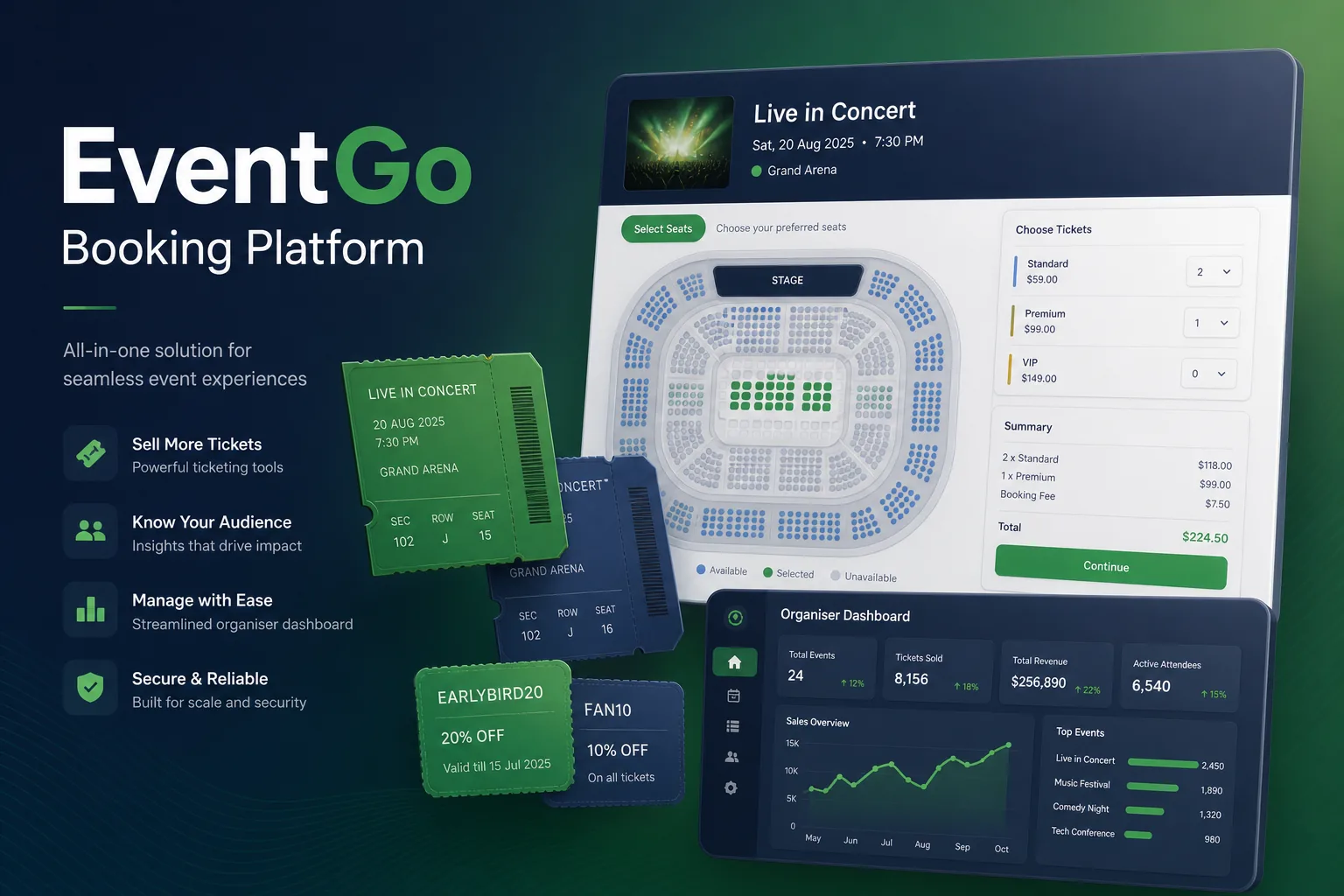
Project overview
We built an event ticketing platform for a company selling tickets on behalf of independent organisers — concerts, comedy nights, conferences and sports fixtures. Organisers create events, design seating, set prices and discount codes; buyers choose seats, pay and receive QR tickets; door staff scan them on their phones.
The engagement covered discovery, UX, a Next.js web app, Postgres data model, Stripe payments and payouts, the organiser dashboard and a check-in app. It is part of our web app development work for the travel, hospitality and events space.
The client and the challenge
The client had been reselling through a generic ticketing tool that only supported general admission. Seated venues were handled by emailing seat numbers after purchase, which caused double-sold seats, and organisers waited on manual bank transfers after each show.
They needed reserved seating that could not be double-booked when a popular event opened, flexible pricing with tiers and coupons, fast check-in at the door even with weak venue signal, and payouts that organisers could track themselves.
Solution architecture & delivery
Event pages are rendered with Next.js on the server so they load quickly and are indexable, while the seat picker runs as an interactive client component. Organisers build venue layouts once — sections, rows, seats, accessible spaces and price zones — and reuse them across events; each event gets its own seat inventory in Postgres.
Seat locking relies on Postgres rather than application memory. When a buyer selects seats, a single transaction marks them held with an expiry time only if they are still available, so two buyers can never hold the same seat. The hold lasts for the checkout window; if payment does not complete, a cleanup job releases the seats and the map updates for other buyers. Accessible seats and their companion seats are linked so they are booked together, and single empty seats left stranded between bookings are flagged to the buyer before checkout. For on-sale moments, a virtual queue admits buyers to the seat map in batches so the database is not flooded.
Checkout uses Stripe with cards and wallets. Coupons are validated server-side against rules the organiser sets — percentage or fixed, ticket type, quantity limits and date range — and the discount is stored on each ticket for reporting. Once payment succeeds, a webhook confirms the order, issues signed QR tickets and emails them. Stripe's connected accounts hold each organiser's share, and transfers run automatically after the event, net of fees and refunds. Refunds and event cancellations are handled from the organiser dashboard: a cancelled event refunds every order in the background, releases the inventory and emails attendees, while partial refunds adjust the organiser's pending payout rather than pulling money back after transfer.
The check-in app downloads the event's ticket list before doors open, so scanning works offline; the signature on each QR code is verified locally and duplicate scans are flagged, then syncs when signal returns. Releases went through our CI/CD and testing pipeline, including load tests of the seat-hold path before large on-sales.
Key features we built
- Reusable venue layouts with sections, rows, accessible seats and price zones
- Live seat map with transactional holds that prevent double-selling
- General admission, tiered pricing and early-bird ticket types
- Organiser-defined coupon codes with usage and date rules
- Virtual queue for high-demand on-sales
- Signed QR e-tickets delivered by email and in the buyer account
- Offline-capable check-in web app with duplicate-scan detection
- Organiser dashboard for sales, refunds, attendee exports and payouts
How we delivered it
- Discovery. Interviews with organisers, venue managers and door staff to map event set-up, seating, sales, refunds and check-in, plus a review of past double-booking incidents.
- UX and prototype. Prototypes of the seat picker on mobile and desktop and of the venue layout editor, tested with organisers building real venues.
- Build. Two-week sprints starting with the inventory and hold model, then checkout, the organiser dashboard and the check-in app.
- Pilot events. Launch with a handful of organisers, running check-in alongside the old process for the first shows to prove the offline scanning.
- Support. Ongoing maintenance, new ticket types and payout rules, and load preparation ahead of big on-sales.
Technology choices
- Next.js — server-rendered event pages for speed and search visibility, with interactive client components for the seat map and checkout.
- Stripe — card and wallet payments, connected accounts for organiser payouts, and webhooks that confirm orders reliably.
- Postgres — transactional seat holds and row-level locking that guarantee a seat is only sold once, plus reporting over orders and coupons.
Outcomes
- Reserved seats are chosen by buyers on a live map instead of being assigned by email after purchase
- Double-sold seats stopped because holds are enforced in the database
- Organisers set up events, pricing and coupons themselves without the client's support team
- Door staff scan tickets on their own phones, even without venue signal
- Payouts reach organisers automatically after each event with a clear breakdown of fees and refunds
FAQ
How does the seat map prevent two people buying the same seat?
Selecting a seat runs a database transaction that only succeeds if the seat is still available, placing a time-limited hold. The hold is confirmed on payment or released when it expires, so the same seat cannot be held twice.
Does QR ticket check-in work without internet at the venue?
Yes. The check-in app downloads the ticket list before doors open, verifies each QR signature on the device and flags duplicates, then syncs scans when connectivity returns.
Can the platform sell travel packages or hotel stays with event tickets?
It can be extended with bundled inventory. Our travel booking platform case study shows how we handle flights, hotels and packages.
How much does an event ticketing platform cost to build?
It depends on seating complexity, payout rules, on-sale traffic and check-in requirements. Our app development cost calculator gives an indicative range and timeline before a fixed-price proposal.
Event Ticketing Platform with Seat Maps screens
Build your next travel & hospitality product with Next Olive
Share your requirements — we will propose scope, timeline and stack within one business day.