
Law Firm Case Management System
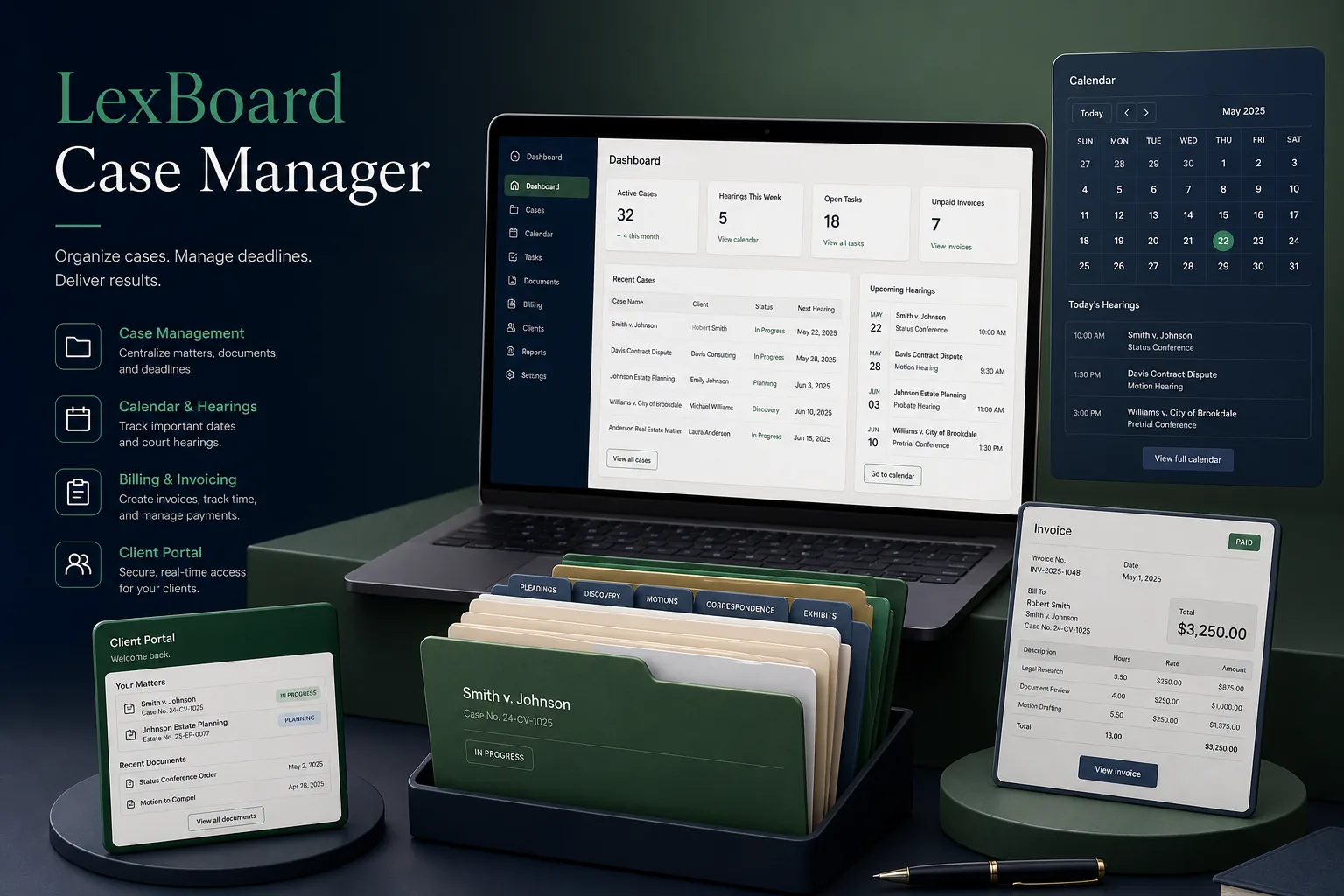
A case management system for a litigation law firm that keeps matters, documents, hearing dates, time entries and invoices in one place, with a secure portal for clients.
Project overview
We built a case management system for a mid-sized litigation firm with several partners, associates and a busy support team. Every matter now has one file holding parties, documents, hearing history, tasks, time entries and invoices, and clients can log in to see progress on their own matters.
The engagement covered process discovery with partners and clerks, UX, an ASP.NET web application on SQL Server, migration of active matters and training. It reflects our broader custom software development work for professional services firms.
The client and the challenge
The firm kept matters in shared folders, hearing dates in a paper diary copied into personal calendars, and time on timesheets typed up at month end. Missed adjournment updates were a real risk, billable time went unrecorded, and clients phoned the office for routine status updates.
Because the data was privileged and confidential, the firm also needed strict separation between matters, conflict checks before taking on new clients, an audit trail of who opened which file, and a client portal that exposed only what a lawyer had deliberately shared.
Solution architecture & delivery
The ASP.NET application is organised around the matter. Opening a new matter starts with a conflict check: the names of the client, opposing parties and related entities are searched across all existing matters and contacts in SQL Server, including phonetic matches, and any hit must be cleared by a partner before the matter is created. The decision and the search results are stored on the matter.
Each matter holds parties, court and case numbers, a document register with version history, tasks and a hearing timeline. When a clerk records the outcome of a hearing and the next date, the system updates the firm calendar, creates preparation tasks at intervals before the next hearing and notifies the responsible lawyers by email and SMS. A daily cause list shows every hearing the firm has, grouped by court, so nothing depends on one person's diary.
Lawyers record time against a matter from a running timer or a quick entry form, with activity codes and narrative. Billing supports hourly rates by fee earner, fixed fees per stage and disbursements; partners review draft invoices, write off or adjust entries with a reason, and approve them before they are issued. Payments and outstanding balances are tracked per client, and money received on account is recorded separately from fees earned so client funds are never mixed with the firm's own income in reports. Unbilled time and overdue invoices appear on each partner's dashboard, grouped by matter.
Confidentiality is built into the data model. Matters can be restricted to named team members, which creates an ethical wall that also hides them from search. Every open, download and edit is written to an audit log. The client portal uses separate accounts and only displays documents, updates and invoices a lawyer has marked as shared; privileged internal notes never leave the firm's side of the application.
Key features we built
- Conflict-of-interest checks with partner clearance before opening a matter
- Matter files with parties, court details, documents and version history
- Hearing timeline with automatic next-date tasks and reminders
- Firm-wide daily cause list grouped by court
- Time recording with timers, activity codes and narratives
- Hourly, fixed-fee and disbursement billing with partner approval
- Restricted matters, ethical walls and a full access audit log
- Secure client portal for shared documents, updates and invoices
How we delivered it
- Discovery. Interviews with partners, associates, clerks and accounts staff, and a walk-through of how a matter moves from enquiry to final bill, including the firm's confidentiality rules.
- UX and prototype. Prototypes of the matter view, hearing update and time entry screens, refined until clerks could record a hearing outcome in a few clicks.
- Build. Two-week sprints delivering matters and the calendar first, then time and billing, then the client portal, following our CI/CD and testing pipeline.
- Migration and launch. Active matters, contacts and upcoming hearing dates imported and checked against the paper diary before the old folders were made read-only.
- Support. Ongoing maintenance, new invoice formats and report requests, with later work exploring document summarisation similar to our AI legal document summariser.
Technology choices
- ASP.NET — a mature web framework with strong authentication, role-based authorisation and server-side rendering suited to form-heavy legal workflows.
- SQL Server — transactional integrity for time and billing, full-text search for conflict checks and documents, and row-level security for restricted matters.
Outcomes
- Hearing dates live in one firm calendar with automatic reminders instead of a paper diary
- Conflict checks are run and recorded for every new matter
- Lawyers record time as they work, so less billable time is lost at month end
- Partners approve invoices from recorded time rather than rebuilding them from timesheets
- Clients check matter progress and shared documents in the portal instead of calling the office
- The firm can show who accessed each confidential file and when
FAQ
How does the case management system handle conflict checks?
Before a matter is opened, client and opposing party names are searched across all matters and contacts, including close spellings. Any possible conflict must be cleared by a partner, and the check is saved on the matter.
What can clients see in the client portal?
Only what a lawyer marks as shared: selected documents, status updates, upcoming hearing dates and invoices. Internal notes, time entries and privileged material stay inside the firm's application.
Can the system integrate AI for contract or document review?
Yes. Documents already sit in a structured register, so AI features such as summaries can be added behind the same access controls; see our AI development services for the approach.
How much does legal case management software cost to build?
It depends on practice areas, billing rules, migration and portal scope. Our app development cost calculator gives an indicative range and timeline before we scope a fixed quote.
Law Firm Case Management System screens
Build your next web applications product with Next Olive
Share your requirements — we will propose scope, timeline and stack within one business day.