
Omnichannel Helpdesk SaaS
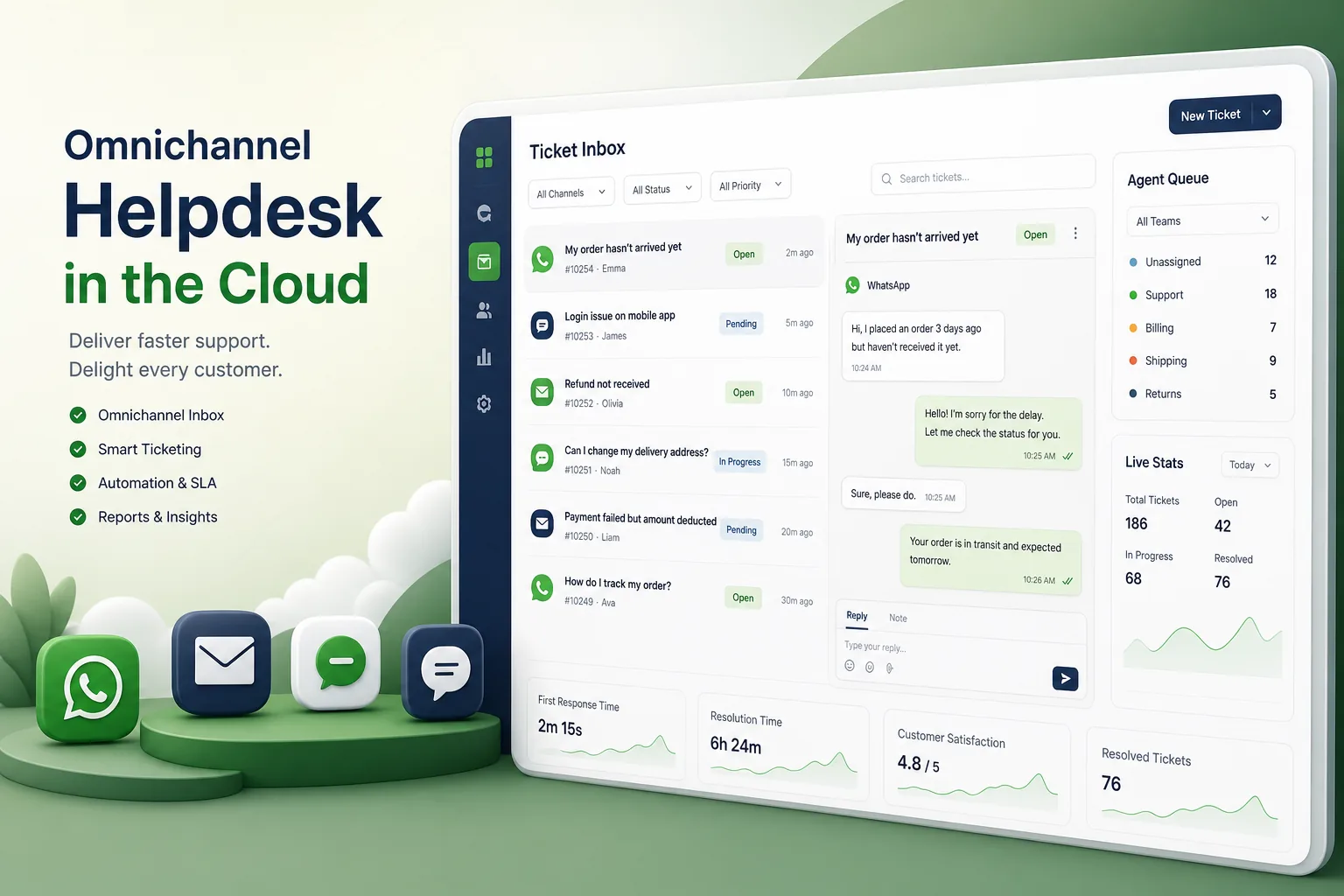
A multi-tenant helpdesk SaaS that brings email, website chat, WhatsApp and voice calls into one ticket inbox, with routing, SLAs, automation rules and subscription billing.
Project overview
We built a helpdesk SaaS product for a startup selling to small and mid-sized businesses. Each customer company gets its own workspace where support agents answer email, website chat, WhatsApp messages and phone calls from one inbox, with every conversation stored as a ticket that keeps the full history across channels.
The engagement covered product discovery, multi-tenant architecture, the React agent app, Node.js channel and automation services, the Postgres data model, subscription billing and launch. It is part of our SaaS application development work for product companies.
The client and the challenge
The founders' target customers were juggling a shared mailbox, a separate chat tool and staff phones for WhatsApp. Conversations were duplicated or lost, nobody knew who owned a reply, and managers could not see response times or backlog.
The product had to connect very different channels into one consistent ticket model, deliver new messages to agents in real time, let each tenant customise routing and automation, and keep every tenant's customer data strictly separated, since helpdesks hold personal information about their customers' customers.
Solution architecture & delivery
Each channel has a Node.js connector that converts inbound traffic into a common message event. Email arrives through forwarding addresses and is threaded by message headers; the embeddable chat widget uses websockets; WhatsApp Business messages arrive through webhooks from the messaging API; and calls come from a cloud telephony provider, with voicemail and call recordings attached to the ticket. A contact resolver matches the sender by email or phone number, so a customer who emails and then messages on WhatsApp lands in the same ticket history.
Messages are written to Postgres and published to agents in real time, so the React inbox updates without refreshing and shows when a colleague is already replying. Routing rules assign tickets by channel, language, keywords or customer tier using round-robin or load-based assignment. SLA policies set first-response and resolution targets per priority, and a scheduler escalates tickets approaching breach. Tenant admins build automation rules with a condition-and-action editor, and outbound webhooks let them notify other systems when tickets change.
Tenant isolation is enforced in the database, not only in application code. Every table carries a tenant ID and Postgres row-level security policies restrict each connection to its tenant, the approach described in our multi-tenant Postgres data isolation article. Attachments are stored in cloud object storage under tenant-specific paths with short-lived signed links. Admin actions are recorded in an audit log, and tenants can export or delete customer data and set retention periods to meet their own privacy obligations.
Plans control seats, channels and automation limits. The billing service maps each subscription to entitlements checked at runtime, handles upgrades and seat changes mid-cycle, and shows usage in the tenant's admin console. Single sign-on options were added for larger customers. Trials convert to paid plans without losing configuration, and lapsed subscriptions move to read-only rather than deleting data immediately.
Key features we built
- Unified inbox for email, website chat, WhatsApp and voice tickets
- Contact matching that merges one customer's conversations across channels
- Real-time agent collision detection and live ticket updates
- Routing by channel, keywords and customer tier with load-based assignment
- SLA policies with timers and automatic escalations
- No-code automation rules and outbound webhooks
- Tenant isolation with row-level security and audit logs
- Subscription plans, seat billing, entitlements and SSO options
How we delivered it
- Discovery. We interviewed support teams at prospective customers, mapped their channel mix and defined the ticket model, plan structure and MVP scope with the founders.
- Architecture and UX. Multi-tenant data design and channel connectors were proven in a technical spike while the agent inbox was prototyped and tested with support agents.
- Build. Two-week sprints delivered email and chat first, then WhatsApp, voice, SLAs, automation and billing, each behind feature flags.
- Beta and launch. A group of beta tenants used the product for real support work, helping us tune threading, routing and notification behaviour before public launch.
- Support. Ongoing product development covers new integrations, reporting and performance work as tenant volume grows.
Technology choices
- React — a responsive, real-time agent inbox with complex state for tickets, drafts and live collision indicators.
- Node.js — event-driven connectors and websocket delivery suited to many concurrent channel webhooks and live conversations.
- Postgres — reliable relational storage with row-level security for tenant isolation and full-text search across ticket history.
Outcomes
- Support teams answer every channel from one inbox instead of switching between tools
- Customers who change channel keep one continuous conversation history
- Agents no longer send duplicate replies because they can see who is already responding
- Managers track SLA performance and backlog in real time
- Tenants configure their own routing and automation without developer help
- Customer data stays isolated per tenant at the database level
FAQ
How does the helpdesk combine different channels into one ticket?
Each channel connector converts inbound messages into a common event. A contact resolver matches the sender by email or phone number and appends the message to that customer's open ticket, or creates a new one.
How is data kept separate between helpdesk customers?
Every record carries a tenant ID and Postgres row-level security restricts queries to the current tenant. Files use tenant-scoped storage paths and signed links, and tenants control retention and export of their data.
Can AI be added to answer common questions automatically?
Yes. A retrieval-based assistant can suggest replies or resolve simple questions from the tenant's knowledge base, with hand-off to agents. Our workflow automation SaaS case study and email marketing SaaS case study show related multi-tenant builds.
How much does it cost to build a helpdesk SaaS?
It depends on the channels supported, automation depth, billing model and compliance needs. Use our SaaS development cost calculator for an indicative range, then we can plan an MVP scope.
Omnichannel Helpdesk SaaS screens
Build your next saas products product with Next Olive
Share your requirements — we will propose scope, timeline and stack within one business day.