
Clinic Scheduling and Patient Records App
A Windows desktop application for small practices that runs the appointment book, patient records, consultation notes and invoices on local, encrypted storage.
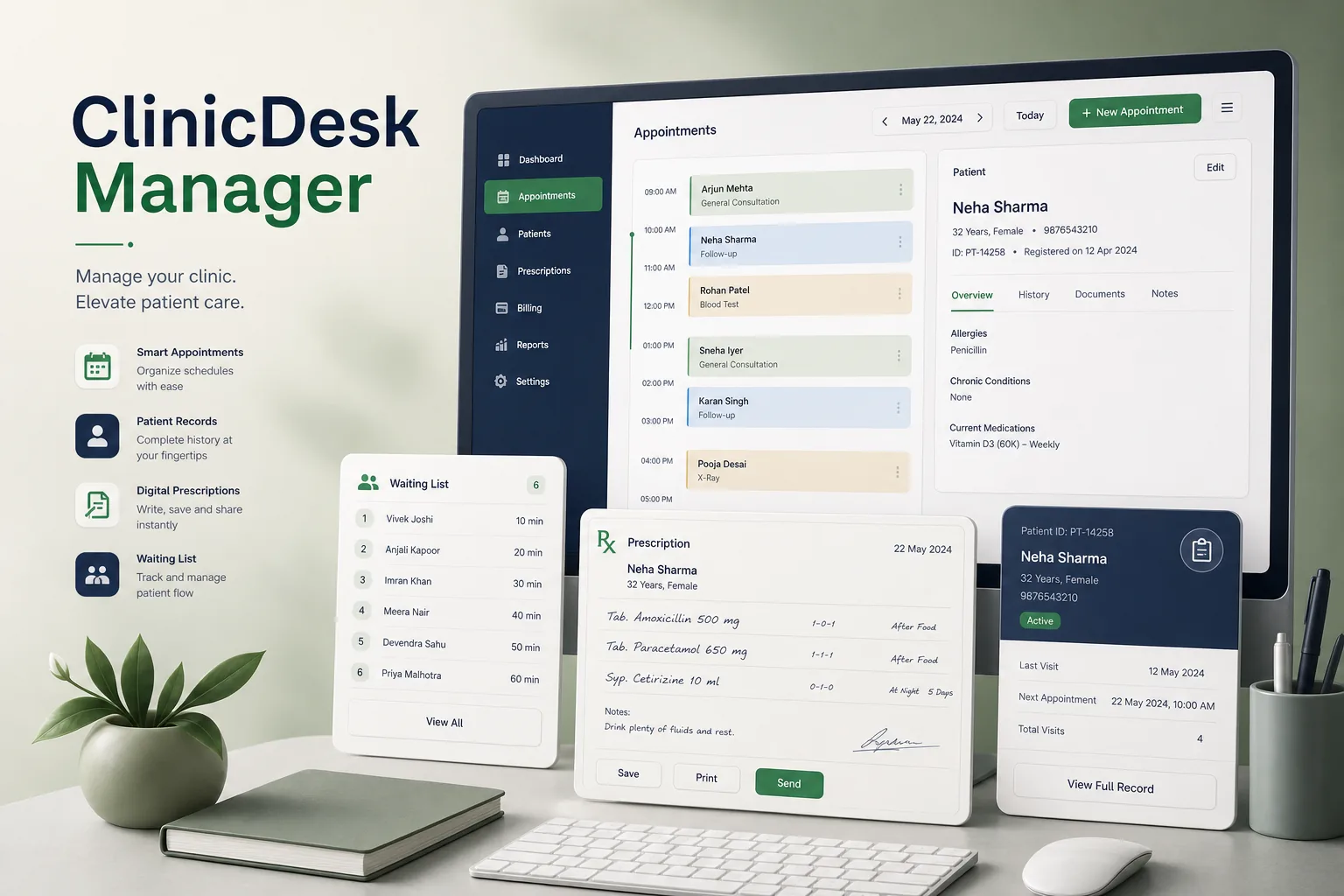
Project overview
We built a clinic management application for a vendor selling to small practices such as family doctors, physiotherapists and specialist consultants. Reception staff book and check in patients, clinicians record consultations and prescriptions, and the practice raises invoices — all on the practice's own computers.
The engagement covered discovery, UX, a WPF application, a SQL Server LocalDB data layer, installer and update tooling, and a pilot. It is part of our healthcare software development practice, and pairs with our clinic appointment web app case study.
The client and the challenge
Many of the vendor's customers had unreliable internet and were wary of putting patient records online, but were still using paper diaries and folders. The vendor's previous tool was a thin database front end with weak access control, no encryption and no audit trail. Appointment clashes were common when two people answered the phone at once, missed appointments were hard to follow up, and finding a patient's previous notes meant searching paper folders during the consultation.
They needed a fast, reliable desktop product that small practices could install themselves, with protected patient data, role-based access, a proper appointment book and simple backups — without a server room or IT staff.
Solution architecture & delivery
The WPF application runs on each workstation with SQL Server LocalDB as its embedded database. The main practice PC holds the primary database, and other workstations on the local network sync with it through a lightweight service; if the network drops, a workstation keeps working against its local copy and reconciles appointments and notes when it reconnects, flagging genuine conflicts for reception to resolve.
The appointment book supports multiple clinicians and rooms, appointment types with default durations, recurring bookings and waiting lists. Check-in marks the patient as arrived on the clinician's screen, and double-booking rules are enforced in the database rather than only in the UI, so two receptionists cannot take the same slot. Reception can print a day list per clinician, send appointment reminders by SMS or email, and mark non-attendances, which feed a simple report so staff can follow up with patients who miss visits.
Patient records hold demographics, allergies, history, consultation notes, prescriptions and scanned documents from connected scanners. Clinical fields are encrypted at rest, and roles decide access: reception sees contact and booking details but not notes, clinicians see their patients' clinical records. Every open, change and print of a record is written to an audit log, and signed notes can only be amended with a visible addendum. Patient search works by name, date of birth or phone number from any screen, and a patient summary panel shows upcoming appointments, outstanding invoices and allergy warnings before a clinician opens the full record.
Invoices are generated from consultation codes and printed or saved as PDF. Nightly encrypted backups go to an external drive or network location with a restore wizard, and an automatic update channel delivers releases. Batch utilities import patient lists from the older tool and spreadsheets, and the design follows our security and compliance approach for sensitive data.
Key features we built
- Multi-clinician appointment book with rooms, recurring bookings and waiting lists
- Check-in and arrival status visible on clinician screens
- Patient records with allergies, history, notes, prescriptions and scans
- Encrypted clinical fields and role-based access for reception and clinicians
- Audit log of every view, change and print, with addenda on signed notes
- Local network sync with offline working and conflict flags
- Invoicing with printing and PDF export
- Encrypted scheduled backups, restore wizard and automatic updates
How we delivered it
- Discovery. Visits to small practices to observe reception and consultation workflows, and documenting privacy and record-keeping expectations with the vendor.
- UX. Keyboard-friendly prototypes of the appointment book and consultation screen, tested with receptionists and clinicians.
- Build. Two-week sprints on scheduling, records, sync and billing, with automated tests for sync conflicts and access rules.
- Pilot. Installation at a few friendly practices, including migration from the old tool and backup and restore drills.
- Release and support. General release with a self-install package, update channel and ongoing maintenance, using our CI/CD pipeline.
Technology choices
- WPF — a mature Windows UI framework for dense, keyboard-driven scheduling and records screens with reliable printing and scanner access.
- SQL Server LocalDB — a lightweight, zero-administration SQL Server engine that installs with the app yet supports proper constraints and encryption.
Outcomes
- Practices moved from paper diaries and folders to a digital appointment book and records
- Patient data stays on the practice's own machines, encrypted and access-controlled
- Reception and clinicians keep working when the network or internet drops
- Every access to a patient record is traceable in the audit log
- Practices install, back up and update the software without IT staff
FAQ
Why a desktop app instead of a cloud clinic system?
The vendor's customers often had poor connectivity and preferred to keep records on their own machines. A desktop app with local network sync keeps working offline while still sharing the appointment book across the practice.
How is patient privacy protected?
Clinical fields are encrypted at rest, access is role-based, every view and change is audited, signed notes cannot be silently edited, and backups are encrypted. Each practice remains responsible for its own regulatory obligations. Records can also be exported in a structured format on a patient's request, and archived or removed according to the retention period each practice configures.
Can it connect to a lab system or online booking later?
Yes. The data layer exposes import and export interfaces. Our lab information system and healthcare industry pages show related integrations.
How much does clinic management software like this cost?
Cost depends on modules, sync requirements, integrations and migration. Use our app development cost calculator for an indicative range, or contact us for a scoped estimate.
Clinic Scheduling and Patient Records App screens
Build your next healthcare product with Next Olive
Share your requirements — we will propose scope, timeline and stack within one business day.