
Lab Information System with Analyser Links
A laboratory information system for diagnostic labs that registers and barcodes samples, builds worksheets, receives results directly from analysers and releases verified reports.
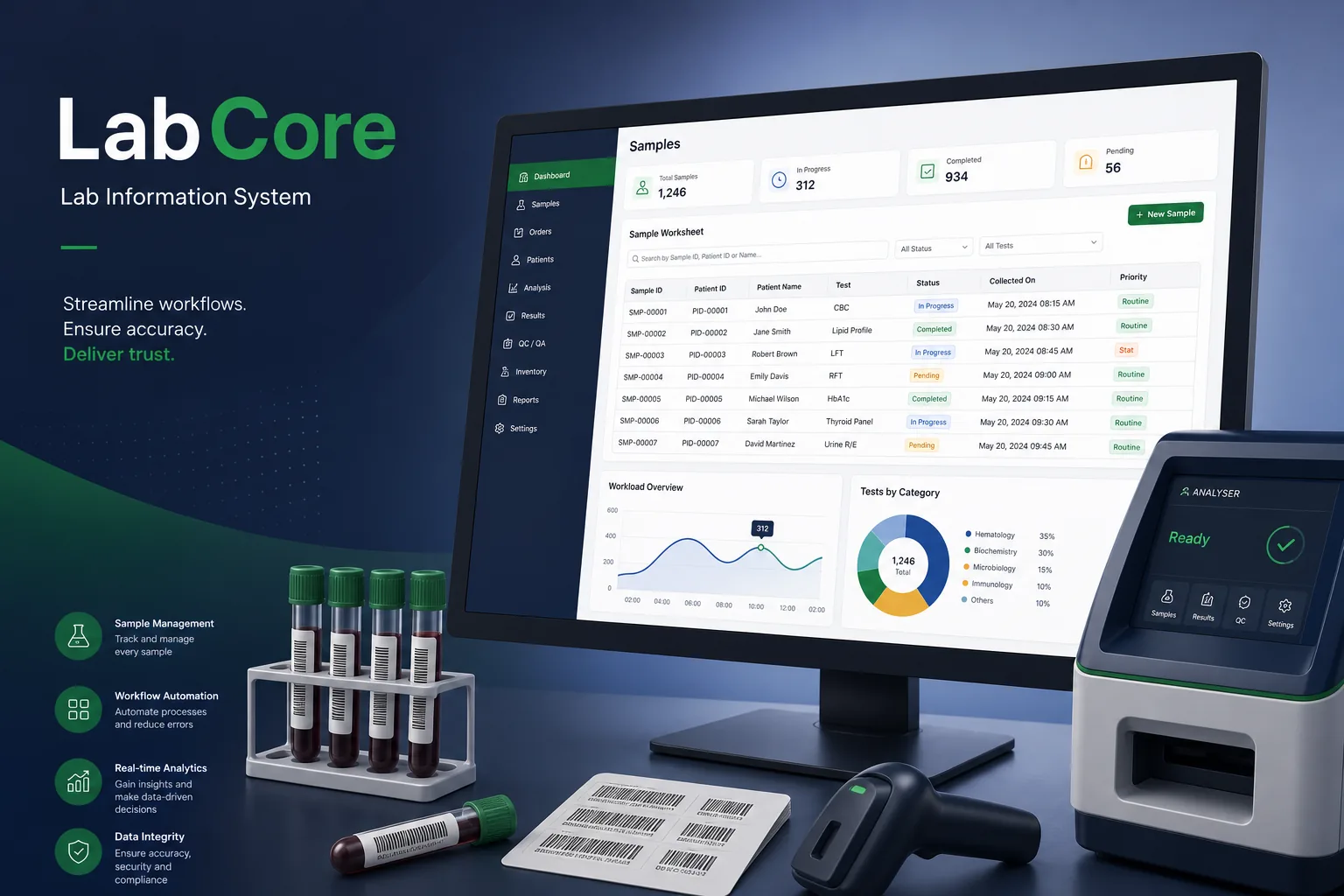
Project overview
We built a laboratory information system (LIS) for a diagnostic group running a main processing lab and several collection centres. Reception registers patients and orders tests, collection staff label samples, bench technicians run worksheets on analysers, and pathologists verify and release reports.
The engagement covered discovery, UX, a WPF client, a SQL Server database, analyser interface drivers, migration and go-live. It is part of our healthcare software development work and connects naturally to our clinic management app and hospital management suite projects.
The client and the challenge
Results were being read off analyser printouts and typed into a basic reporting tool, which was slow and let transcription errors slip through. Handwritten labels caused sample mix-ups, and there was no reliable way to see which samples were pending, rerun or overdue. Referring doctors phoned the lab to ask whether reports were ready, and there was no simple way to answer, because pending work was spread across notebooks at each bench.
The group wanted positive sample identification from collection to report, direct result capture from its analysers, rule-based checks before release, and full traceability of who did what — with strict control over patient data.
Solution architecture & delivery
At registration, the WPF client creates an order with the requested tests and panels, works out which sample containers are needed, and prints barcode labels for each tube. Collection centres scan labels at collection and dispatch, and the main lab scans them on receipt, so every sample has a chain-of-custody trail and missing or rejected samples are flagged immediately.
Worksheets group pending tests by department and analyser. For connected analysers, a Windows interface service speaks each instrument's serial or network protocol: it sends the work list in both directions where supported, receives results keyed by sample barcode, and writes them to SQL Server with the instrument, run and flags. Manual tests use keyboard-optimised entry grids, and all raw analyser messages are kept for troubleshooting. When an analyser flags a sample or a result falls outside the instrument's range, the test is placed on a rerun or dilution list automatically, and quality control runs are recorded so results from a failed control run cannot be released.
Before release, results pass through rules: reference ranges by age and sex, critical values that alert the pathologist, delta checks against the patient's previous result, and reflex rules that add a follow-up test automatically. Technicians perform technical validation, pathologists perform clinical verification and add comments, and only verified results are released to printed or PDF reports. Pending tests are also tracked against turnaround targets configured per test, so overdue samples are listed first on each worksheet and reception can tell a referring doctor exactly which results are still outstanding.
Access is role-based and every result entry, edit, verification and report print is audited, with amendments recorded as new versions rather than overwrites. Patient data is encrypted in transit and at rest, and collection centres see only their own registrations. Clients update automatically from a central channel, and our CI/CD pipeline runs interface regression tests on recorded analyser messages.
Key features we built
- Patient registration and test ordering with automatic container calculation
- Barcode labels and scanning from collection to lab receipt
- Department and analyser worksheets with pending, rerun and overdue views
- Bidirectional analyser interfacing over serial and network connections
- Reference ranges, critical value alerts, delta checks and reflex testing
- Two-step technical validation and pathologist verification
- Versioned result amendments and a full audit trail
- Printed and PDF reports with encrypted data and automatic client updates
How we delivered it
- Discovery. Walking samples through collection, receipt, bench and reporting, and cataloguing each analyser's interface protocol and configuration.
- Interface proof. Building and testing the interface service with the first analysers in the lab before starting the main UI.
- Build. Two-week sprints on registration, worksheets, rules, verification and reporting, with pathologists reviewing rule behaviour each sprint.
- Parallel run. Running the LIS alongside the old process and comparing reports sample by sample before switching over department by department.
- Support. Adding new analysers and tests through configuration, plus ongoing maintenance and updates.
Technology choices
- WPF — a responsive Windows UI for dense worksheets and entry grids, with direct access to barcode printers, scanners and serial ports.
- SQL Server — a central transactional database for orders, samples and results, with strong auditing, security and reporting support.
Outcomes
- Analyser results flow straight into the LIS instead of being retyped from printouts
- Barcoded samples are tracked from collection to report, reducing mix-up risk
- Critical values and implausible changes are flagged before a report is released
- Staff see pending, rerun and overdue samples on worksheets rather than chasing paper
- Every result change and release is traceable to a named user
FAQ
How does the LIS connect to laboratory analysers?
A Windows interface service communicates with each analyser over its serial or network protocol, sending work lists where supported and receiving results matched to sample barcodes. Raw messages are stored for troubleshooting.
How are results checked before they reach the patient or doctor?
Results pass reference range, critical value, delta and reflex rules, then technical validation by a technician and clinical verification by a pathologist. Only verified results are released. Where a verified report must be corrected, the amended report is clearly marked, the original is kept, and the reason and approving pathologist are recorded against the change.
How is patient data protected in the lab system?
Access is role-based, data is encrypted in transit and at rest, and all actions are audited. See our healthcare industry page for how we approach clinical data.
How much does a laboratory information system cost to build?
It depends on analyser count, departments, rules and integrations. Our software development RFP template helps scope it, and the app development cost calculator gives an indicative range.
Lab Information System with Analyser Links screens
Build your next healthcare product with Next Olive
Share your requirements — we will propose scope, timeline and stack within one business day.