
Offline Retail POS with GST Invoicing
A Windows point-of-sale and billing application for a retail chain that keeps counters selling when the internet drops and produces tax-compliant GST invoices on every sale.
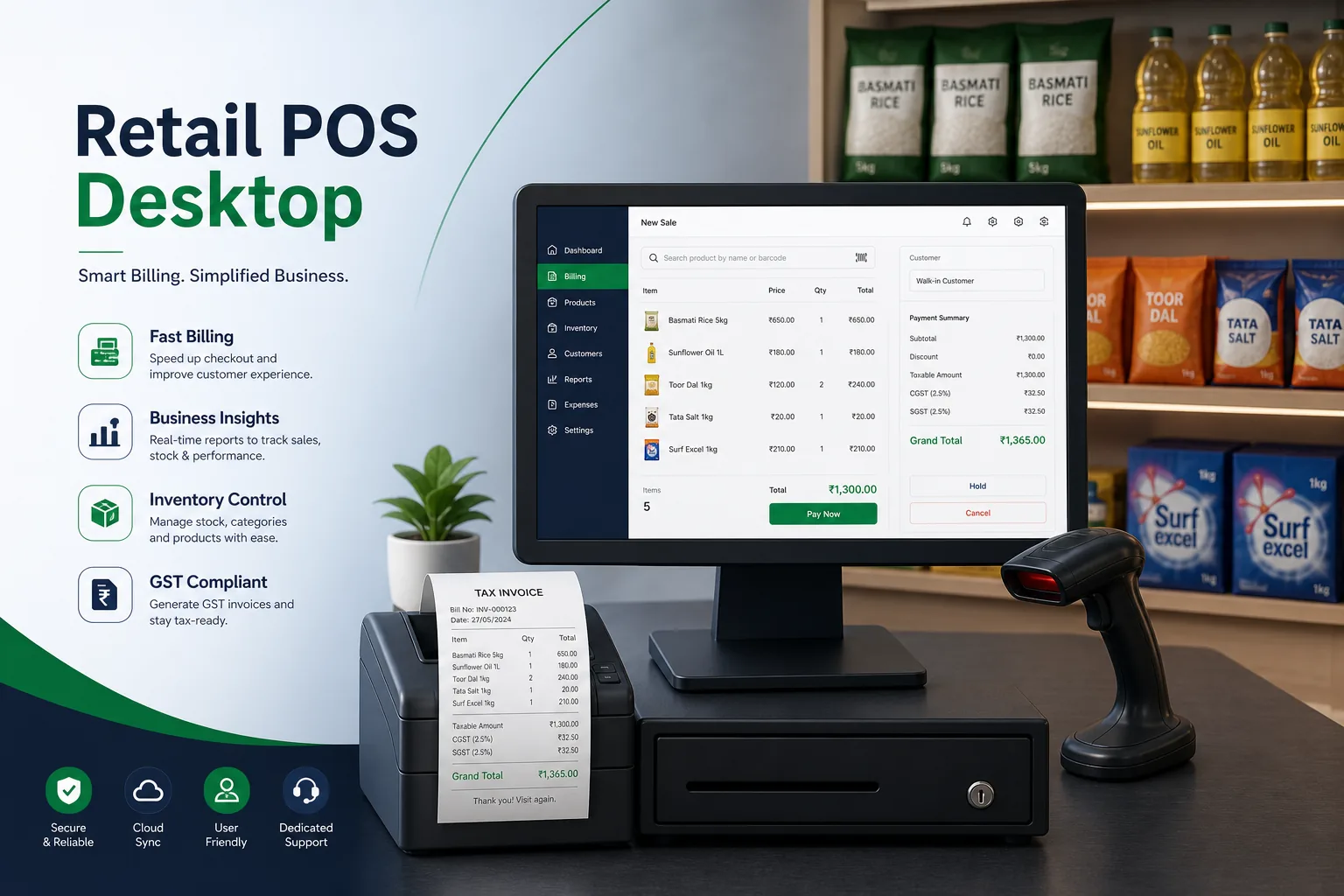
Project overview
We built a desktop point-of-sale and billing system for a retailer running several stores with multiple counters each. Cashiers scan items, apply offers, take mixed payments and print a GST invoice in a few keystrokes, while store managers handle stock receipts, returns, day-end closing and reports from the same application.
The engagement covered discovery at the stores, UX for the billing screen, the WinForms client, the local database and sync layer, hardware integration and a store-by-store roll-out. It builds on our .NET software development practice and our wider work with retail and eCommerce businesses.
The client and the challenge
The retailer's previous billing software depended on a live connection to a central server. When the line went down, counters stopped, queues formed and staff fell back to handwritten bills that had to be re-keyed later, often with tax errors. Price changes reached stores inconsistently, so the same item could ring up differently in two branches.
The client wanted counters that never stop, correct tax on every invoice, one price list pushed from head office, and fast keyboard-and-scanner billing on the modest Windows PCs and thermal printers already installed at the tills.
Solution architecture & delivery
We built the counter application in .NET WinForms because it runs well on low-spec Windows machines, starts quickly and talks directly to serial and USB peripherals. Every counter holds a full local copy of the item master, price lists, tax rates and offers in an encrypted SQLite database, so billing never waits on the network.
Each sale is written locally as an immutable transaction with a counter-specific invoice series, which avoids number clashes between tills without needing a live server. The tax engine applies the correct GST rate per item and splits tax components according to whether the sale is within or across state lines, then prints the invoice with the required fields and a scannable code. Returns and exchanges reference the original invoice rather than editing it, keeping the audit trail intact.
A background sync service pushes completed sales, returns and cash-up records to head office whenever a connection is available and pulls down new prices, items and offers. Sync is idempotent: every record carries a unique ID, so a transaction sent twice after a dropped connection is stored once. Price changes carry an effective date, so all stores switch at the same moment.
Barcode scanners, thermal receipt printers, cash drawers and customer displays are driven through a small hardware abstraction layer, so a store can swap a printer model by changing configuration. Role permissions control discounts, voids and drawer opening, and each override is logged with the cashier and supervisor. Our notes on modernising .NET applications informed how we kept the client maintainable.
Key features we built
- Keyboard and barcode-scanner billing designed for fast counter use
- GST invoices with correct tax splits and per-counter invoice series
- Mixed payments across cash, cards and digital wallets on one bill
- Offers, bundle pricing and member discounts applied automatically
- Returns and exchanges linked to the original invoice
- Fully offline billing with idempotent background sync to head office
- Thermal printer, cash drawer and customer display integration
- Day-end cash-up, shift reports and supervisor override logs
How we delivered it
- Discovery. We spent time at busy counters, recorded how cashiers handled offers, returns and outages, and reviewed the tax invoice requirements with the client's accountants.
- UX and prototype. The billing screen was prototyped for keyboard-only use and timed with real cashiers until common sales needed no mouse at all.
- Build. Two-week sprints delivered the billing client, tax engine, sync service and hardware layer, with automated tests around tax calculation and invoice numbering.
- Pilot and roll-out. One store ran the new POS alongside the old system first; we deliberately cut its connection during trading to prove offline billing and sync before rolling out to every branch.
- Support. Ongoing maintenance covers tax rate changes, new peripherals and updates shipped through a silent update channel outside trading hours.
Technology choices
- .NET WinForms — a fast, lightweight Windows client that runs on existing counter PCs and integrates directly with scanners, printers and cash drawers.
- SQLite — an embedded, encrypted local database so each counter holds its own items, prices and transactions and keeps billing through outages.
Outcomes
- Counters keep billing through internet outages instead of switching to handwritten bills
- Every invoice carries the correct GST breakdown without manual re-keying
- Head office sets prices and offers once and every store applies them at the same time
- Returns and overrides leave a clear audit trail linked to the original sale
- Store managers close the day with cash-up and shift reports generated from the till
- Existing counter PCs and peripherals stayed in use rather than being replaced
FAQ
How does an offline POS avoid duplicate invoice numbers?
Each counter has its own invoice series, and every transaction carries a unique ID. Sales are numbered locally without contacting a server, and the sync service ignores any record it has already received, so retries after a dropped connection never create duplicates.
Why use .NET WinForms for a new POS?
Retail counters often run older, low-powered Windows PCs connected to serial and USB peripherals. WinForms starts quickly, uses little memory and has mature hardware access, which suited this client better than a browser-based till. For stores wanting a cloud-first alternative, see our cloud-based POS case study.
Can the POS connect to inventory and accounting systems?
Yes. Sales, returns and stock movements sync to head office, where they feed stock and accounting records. Our desktop inventory management case study shows the stock side of that picture.
How much does a custom offline POS system cost?
It depends on the number of stores, tax rules, hardware integrations and back-office features required. Use our app development cost calculator for an indicative range, or ask us for a scoped estimate.
Offline Retail POS with GST Invoicing screens
Build your next e-commerce & retail product with Next Olive
Share your requirements — we will propose scope, timeline and stack within one business day.