
Employee Self-Service and Attendance App
An employee self-service app that lets staff clock in, apply for leave, download payslips and follow company news, all connected to the employer's existing HR and payroll systems.
Project overview
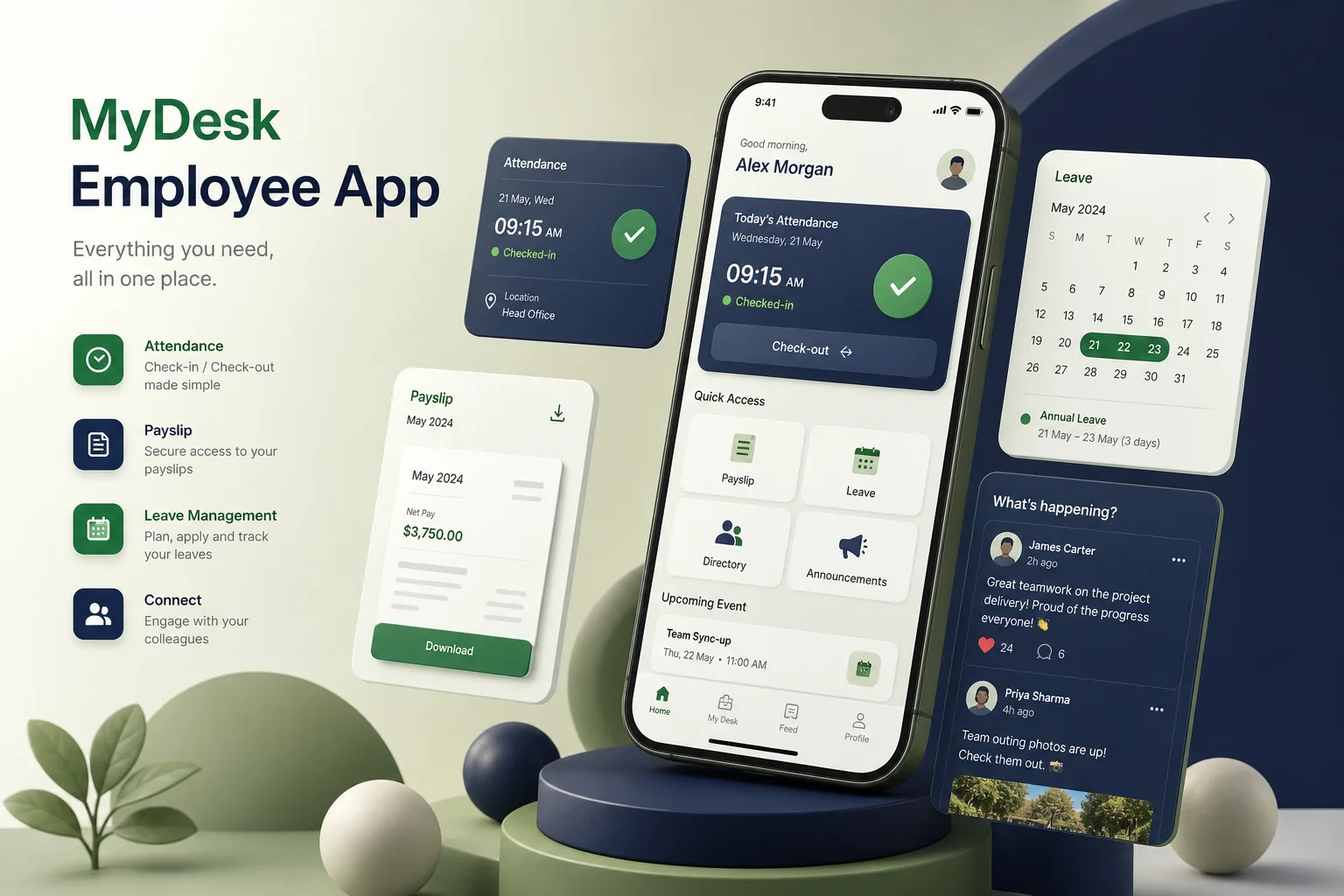
We built an employee app for a company whose staff work across offices, client sites and shifts. Employees use it to mark attendance, request leave, see their balances and payslips, and read company updates; managers approve requests and see who is on shift from the same app.
The engagement covered discovery with HR and operations, the React Native apps, a Node.js integration layer, an admin console and a staged roll-out by department. It builds on our enterprise app development work connecting mobile tools to back-office systems.
The client and the challenge
Attendance was recorded on paper registers and biometric machines at some sites, leave went through email chains, and payslip questions reached HR by phone. Frontline staff without company laptops had no reliable way to see policies or announcements. Managers approved leave without seeing who else was already off, which caused short-staffed shifts, and HR spent a large part of each month correcting attendance records before payroll.
The client wanted one app for every employee, including those on shared or older Android phones, without replacing the HR and payroll software that already held employee records. Location data for attendance needed clear rules so staff trusted how it was used.
Solution architecture & delivery
We chose React Native so one team could ship iOS and Android apps with a shared codebase, and kept the bundle light for lower-end devices. Login uses company single sign-on for office staff and a phone-number one-time password for frontline workers, with optional biometric unlock afterwards.
The Node.js back end acts as an integration layer. A nightly sync and change webhooks pull employees, reporting lines, shifts and leave balances from the HR system; approved leave and attendance records are written back through its API, so HR's software remains the system of record. Payslips are fetched on demand from payroll and never cached on the device.
Attendance uses a geofence around each work site. When an employee taps Clock in, the app takes a single location reading, checks it against the site boundary and records the result with the shift. Location is not tracked in the background. Outside the geofence, the employee can still clock in with a reason, which goes to their manager to accept or query. A short offline queue handles basements and sites with poor signal. Managers see a daily exceptions list rather than every record, so their review stays short, and HR can adjust geofences from the console when a site moves.
The news feed supports posts, polls and acknowledgements for policy documents, targeted by location or department. Moderation tools and comment controls sit in the HR console alongside reports on attendance exceptions and pending approvals. Posts can be scheduled, pinned or translated by the communications team, and read receipts on mandatory notices give HR evidence that a policy has been seen.
Key features we built
- Geofenced clock-in and clock-out with manager review of exceptions
- Leave requests, balances and one-tap manager approvals
- Secure payslip and tax document downloads
- Company news feed with targeted posts, polls and policy acknowledgements
- Shift schedules and team availability for managers
- Single sign-on or one-time password login with biometric unlock
- Push notifications for approvals, announcements and shift changes
- HR admin console for content, exceptions and reporting
How we delivered it
- Discovery. Site visits and interviews with frontline staff, managers and HR, plus a review of the HR and payroll system APIs and data ownership rules.
- UX and prototype. Prototypes tested on low-cost Android devices with staff who rarely used work software, simplifying navigation to a few large actions.
- Build. Two-week sprints for the apps, integration layer and console, with integration tests against a copy of the HR system's sandbox.
- Pilot. A pilot with one department to tune geofence radii, exception reasons and notification frequency before wider release.
- Roll-out and support. Department-by-department roll-out through managed app distribution, with training material for managers and ongoing support.
Technology choices
- React Native — one codebase for iOS and Android, a fast release cycle and a lightweight app that runs well on older devices.
- Node.js — an efficient integration layer for HR and payroll APIs, webhooks, notifications and the admin console's endpoints.
Outcomes
- Frontline staff mark attendance, apply for leave and see payslips from their own phones
- Managers approve requests in the app instead of chasing email threads and paper registers
- HR software stays the single source of truth, with no duplicate employee records to maintain
- Company announcements and policy acknowledgements reach staff who have no work computer
- Clear, single-reading location checks made attendance acceptable to employees
- Payroll preparation starts from approved attendance and leave data instead of manually corrected registers
FAQ
Does the employee app track staff location all the time?
No. It takes one location reading when an employee clocks in or out and compares it with the site geofence. There is no background tracking, and the privacy notice in the app explains exactly what is stored. Employees can view their own attendance history, and HR can only see location results for clock events, not a movement trail.
Can the app integrate with our existing HRMS and payroll?
Yes. The Node.js layer syncs employees and balances and writes approvals back through the HR system's API. For a full HR platform build, see our HRMS and payroll case study.
Can employees ask HR policy questions inside the app?
It can be extended with an assistant that answers from the company's policy documents, similar to our AI HR chatbot. Our guide to HRMS software development covers related modules.
How much does an employee self-service app cost?
It depends on the number of integrations, login methods and modules such as shifts or the news feed. Try our app development cost calculator for an indicative range, then we can scope it with you.
Employee Self-Service and Attendance App screens
Build your next mobile applications product with Next Olive
Share your requirements — we will propose scope, timeline and stack within one business day.