
Language Learning App with Speech Scoring
A gamified language learning app with short daily lessons, spaced review and pronunciation feedback that runs on the learner's phone, even offline.
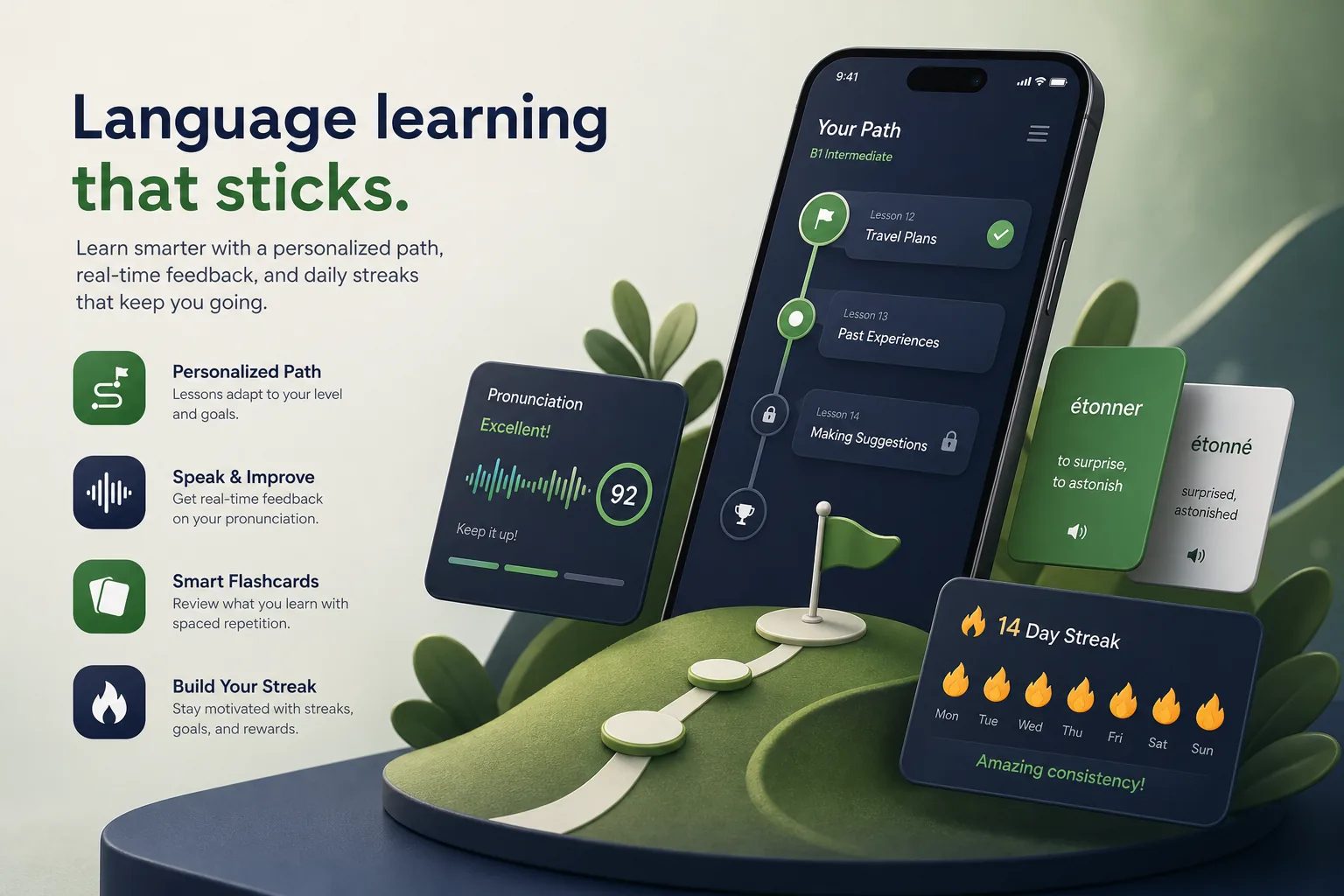
Project overview
We built a language learning app for an edtech startup whose learners wanted to speak with confidence, not just pass grammar quizzes. Learners follow short daily lessons, practise vocabulary with spaced review and repeat phrases aloud to get feedback on their pronunciation.
The engagement covered learning design support, the Flutter apps, an on-device speech scoring model, a content authoring console and subscriptions. It belongs to our education app development work for schools, tutors and learning brands. Speaking practice sits at the centre of every lesson rather than in a separate section.
The client and the challenge
The client's earlier prototype sent every recording to a server for scoring. Feedback was slow on mobile data, costs grew with every exercise, and learners were uneasy about voice recordings leaving their phone. Retention was the other problem: learners started enthusiastically, then dropped away within the first weeks because lessons felt long and repetitive.
They wanted instant speaking feedback that works offline, lessons their linguists could author without developers, and game mechanics that encourage daily practice without turning learning into mindless tapping.
Solution architecture & delivery
We built the apps in Flutter with a lesson player that renders exercise types — listen and choose, word ordering, fill the gap, speak the phrase — from structured lesson files. Linguists create and preview lessons in the authoring console; published courses download to the device in packs, so learners can study on a commute without signal. Each exercise type is a reusable component, so adding a new type does not require changing existing lessons, and lesson packs are versioned so learners mid-course are not disrupted by edits.
Speech scoring runs on the device with TensorFlow Lite. The app records a phrase, extracts audio features and runs a compact acoustic model trained to recognise the target language's phonemes. It aligns the result with the expected phrase and highlights the words or sounds that differed, with a replay of the native speaker's audio. Recordings are processed in memory and discarded; nothing is uploaded unless a learner opts in to share samples to improve the model.
We trained and quantised the model separately for each supported language so it stays small enough for mid-range phones. Scoring thresholds were calibrated with the client's teachers, who rated sample recordings, so the app is encouraging for beginners and stricter at higher levels.
Progress drives a spaced repetition scheduler that brings back words a learner found hard. Streaks, daily goals and friendly leagues are layered over the scheduler, with streak freezes so a missed day does not wipe out motivation. Leagues group learners with similar activity levels, and reminders are scheduled around the time each learner usually practises rather than at a fixed hour.
Key features we built
- Bite-sized lessons with multiple exercise types
- On-device pronunciation scoring with word-level feedback
- Spaced repetition review of vocabulary and phrases
- Downloadable course packs for offline study
- Streaks, daily goals, badges and friendly leagues
- Placement test and level-based learning paths
- Subscriptions with a free tier and trial
- Authoring console for lessons, audio and course publishing
How we delivered it
- Discovery. Sessions with the client's linguists and teachers to define the lesson format, exercise types and what good pronunciation feedback should sound like.
- Model prototype. A proof of on-device scoring for one language on low and mid-range phones before committing the full design, a risk-first approach we use in MVP development.
- UX and build. Two-week sprints for the lesson player, gamification, authoring console and subscriptions, with regular playtests by learners. Accessibility checks covered captions for audio, adjustable playback speed and colour contrast for feedback highlights.
- Beta and calibration. A beta with learners at different levels to calibrate scoring thresholds and tune lesson difficulty and reminders.
- Launch and content growth. Store launch followed by new language packs, model updates shipped with app releases and ongoing support. Each new language started with teacher-rated recordings to train and calibrate its model before lessons were released.
Technology choices
- Flutter — one codebase for iOS and Android with fluid animations for gamified exercises and consistent audio recording and playback.
- TensorFlow Lite — runs a quantised speech model on the device, giving instant, offline pronunciation feedback without uploading recordings. Models are bundled per language pack and updated with it.
Outcomes
- Learners get pronunciation feedback immediately after speaking, including offline
- Voice recordings stay on the device unless a learner chooses to share them
- Server costs no longer grow with every speaking exercise
- Linguists publish and update lessons from the console without waiting for an app release
- Streaks and spaced review give learners a reason to return for short daily practice
- Adding a new language follows a repeatable process for content, audio and model calibration
FAQ
How does on-device speech scoring work?
The app extracts features from the recording and runs a compact TensorFlow Lite model that recognises the language's sounds. It compares them with the expected phrase and highlights the words that differed, all on the phone. Feedback is presented as guidance, such as which vowel to lengthen, rather than a bare pass or fail.
Can the app be used offline?
Yes. Course packs, audio and the scoring model are downloaded to the device. Progress is saved locally and synced to the learner's account when a connection is available. Subscription status is cached so paying learners keep access to downloaded packs while travelling.
Could this be combined with an AI tutor?
Yes. A conversational practice mode could reuse ideas from our AI tutor bot, and our e-learning platform case study shows the course and progress side at scale.
How much does a language learning app cost?
It depends on the number of languages, exercise types, speech features and content tooling. Our app development cost calculator gives an indicative range before a detailed estimate.
Language Learning App with Speech Scoring screens
Build your next education product with Next Olive
Share your requirements — we will propose scope, timeline and stack within one business day.