
CCTV Video Analytics for Safety and PPE
A video analytics system that runs on existing CCTV cameras to count people, check protective equipment in work areas and raise alerts when someone enters a restricted zone.
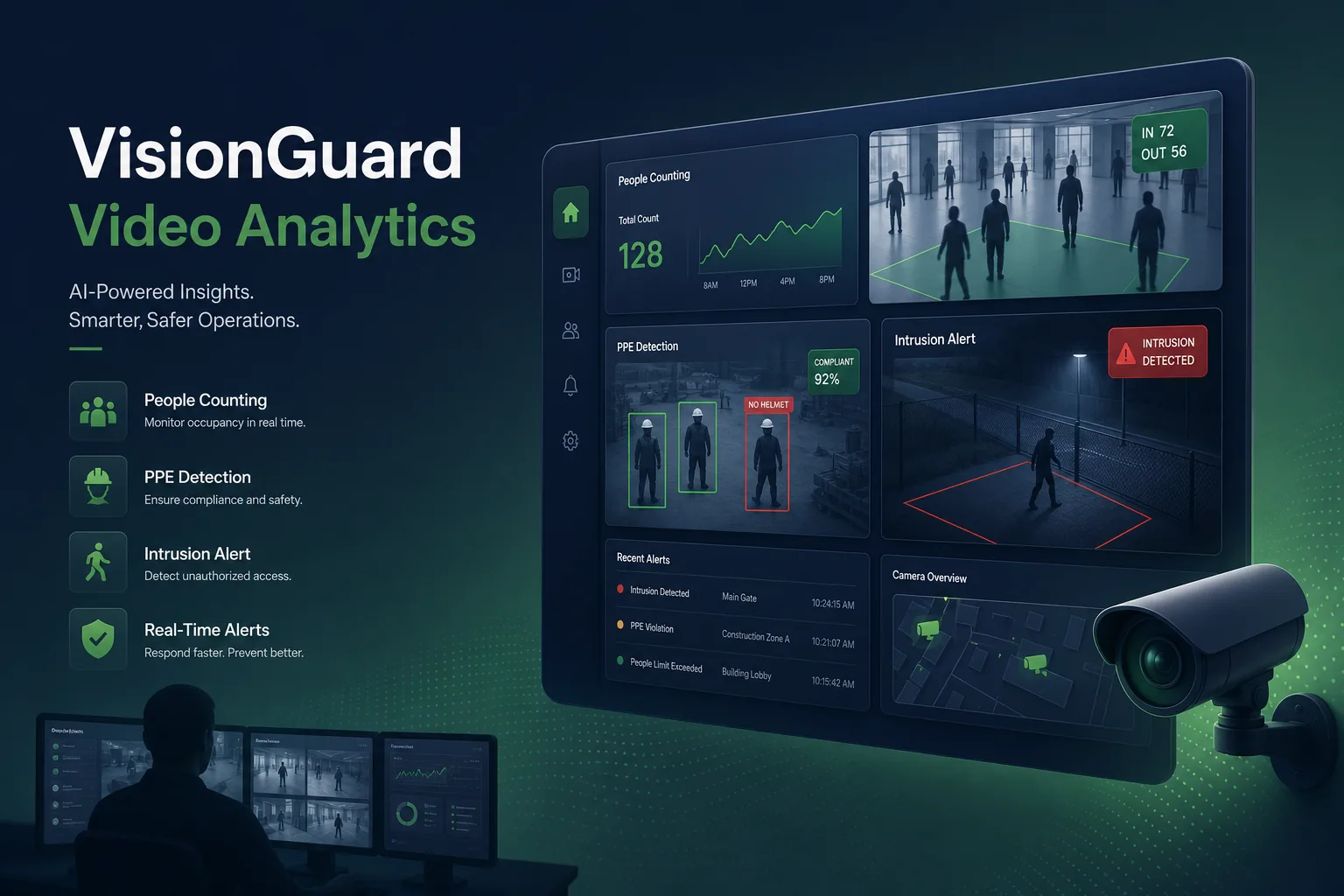
Project overview
We built a video analytics system for an operator of industrial sites with warehouses, loading bays and production areas. The system analyses live feeds from the cameras already installed and detects three things: how many people are in each zone, whether workers in designated areas wear helmets and high-visibility vests, and whether anyone enters a restricted area.
The project covered camera integration, model training, edge deployment, alert workflows and a monitoring console. It was delivered by our computer vision development team, building on techniques from our face recognition web solution.
The client and the challenge
Each site had many cameras but security staff could only watch a few screens at once. Safety breaches were usually found after the fact while reviewing footage, PPE checks relied on supervisors walking the floor, and occupancy limits in some areas were estimated rather than measured.
The client wanted real-time alerts without replacing cameras, and without streaming every feed to the cloud. Lighting varied from bright yards to dim aisles, cameras were mounted at awkward angles, and the operator was clear that the system must not become a tool for identifying or tracking individual employees. Rules also differed by area: a loading bay needed vests at all times, while a restricted store room only mattered outside working hours.
Solution architecture & delivery
Each site runs a GPU edge server on the local network. GStreamer pipelines pull the RTSP streams from the existing cameras, decode them in hardware and pass sampled frames to the detection service, reconnecting automatically when a camera drops out. Each camera's analytics health is monitored, so a blocked lens, frozen stream or tampered camera raises its own maintenance alert rather than silently producing no detections.
Detection uses YOLOv8 models fine-tuned on labelled frames from the client's own cameras, covering people, helmets and high-visibility vests under different lighting and angles. A lightweight tracker follows each detected person across frames within a single camera, so counts are not inflated and a missing helmet is only reported when it persists over several frames rather than for one blurred image. Low-light footage was deliberately over-represented in training so night shifts were not the weak point, and each model version is evaluated per camera group before it is deployed to the edge servers.
Zones are drawn per camera in the console: counting lines, PPE-required areas and restricted polygons with schedules. When a tracked person crosses into a restricted zone out of hours or stays in a PPE area without equipment, the system creates an event with a short clip and snapshot and notifies the responsible supervisor, who acknowledges or dismisses it. Dismissals are labelled and reused to improve the model. People counts are aggregated per zone and time period for occupancy reports, which operations managers use to plan staffing and check limits in controlled areas.
Privacy was designed in. The system does not perform face recognition, faces are blurred in stored snapshots, only event clips are kept and they expire after a retention period set by the client. Only metadata and event clips leave the site, and access to the console is role-based and logged.
Key features we built
- Works with existing IP cameras over standard video streams
- People counting per zone and entrance with live occupancy
- Helmet and high-visibility vest detection in designated areas
- Restricted-zone intrusion alerts with schedules per zone
- Event clips and snapshots with supervisor acknowledgement
- Zone drawing and camera management in a web console
- Face blurring, no identification and configurable clip retention
- False-alarm feedback used to retrain models
How we delivered it
- Site survey. Review of camera positions, stream quality, lighting and network capacity, and agreement on which zones and rules mattered most.
- Data and labelling. Frames collected from the client's cameras across shifts and labelled for people and PPE, with a held-out set for evaluation.
- Build. Two-week sprints delivering the GStreamer ingestion, detection service, alerting and console, with models retrained as labels grew.
- Pilot site. Deployment at one facility in alert-only mode, tuning thresholds and zones with supervisors before notifications went live. Security staff and worker representatives were briefed on what the system does and does not record.
- Roll-out and support. Further sites onboarded one at a time, with model updates and edge server monitoring under a support agreement.
Technology choices
- Python — ties together model inference, tracking, zone logic and the alerting API in one codebase.
- YOLOv8 — fast single-stage detection that runs many camera streams on one edge GPU and fine-tunes well on site-specific footage.
- GStreamer — hardware-accelerated decoding of many RTSP streams with resilient reconnection when cameras drop.
Outcomes
- Security staff respond to prioritised alerts instead of watching every screen
- PPE lapses are raised while work is happening rather than found in later footage reviews
- Occupancy in controlled areas is measured rather than estimated
- Existing cameras gained analytics without hardware replacement
- Video stays on site, with only event clips and metadata shared
- False alarms reduce over time as supervisor feedback retrains the models
FAQ
Does the video analytics system identify employees?
No. It detects people and equipment but does not recognise faces or identities. Faces are blurred in stored snapshots, and only short event clips are retained for a limited period.
Can it run on existing CCTV cameras?
Yes. It reads the standard video streams from IP cameras already installed. We check resolution, angle and lighting during the site survey and suggest adjustments only where detection would otherwise be unreliable.
How are false alarms handled?
Detections must persist across frames before an alert fires, and supervisors can dismiss events. Dismissed events are reviewed and added to training data, similar to how our mobile inspection app feeds field findings back into its workflows. Supervisors can also mute a rule temporarily during planned maintenance work.
What does a CCTV analytics project cost?
It depends on the number of sites and cameras, the detections required and the edge hardware. Our SaaS development cost calculator gives an indicative software range, and we scope hardware after a site survey.
CCTV Video Analytics for Safety and PPE screens
Build your next ai model development product with Next Olive
Share your requirements — we will propose scope, timeline and stack within one business day.