
School ERP with Fees and Parent Portal
A school ERP that runs admissions, fee collection, timetables, attendance and exams across a group of campuses, with a parent portal for payments, notices and progress.
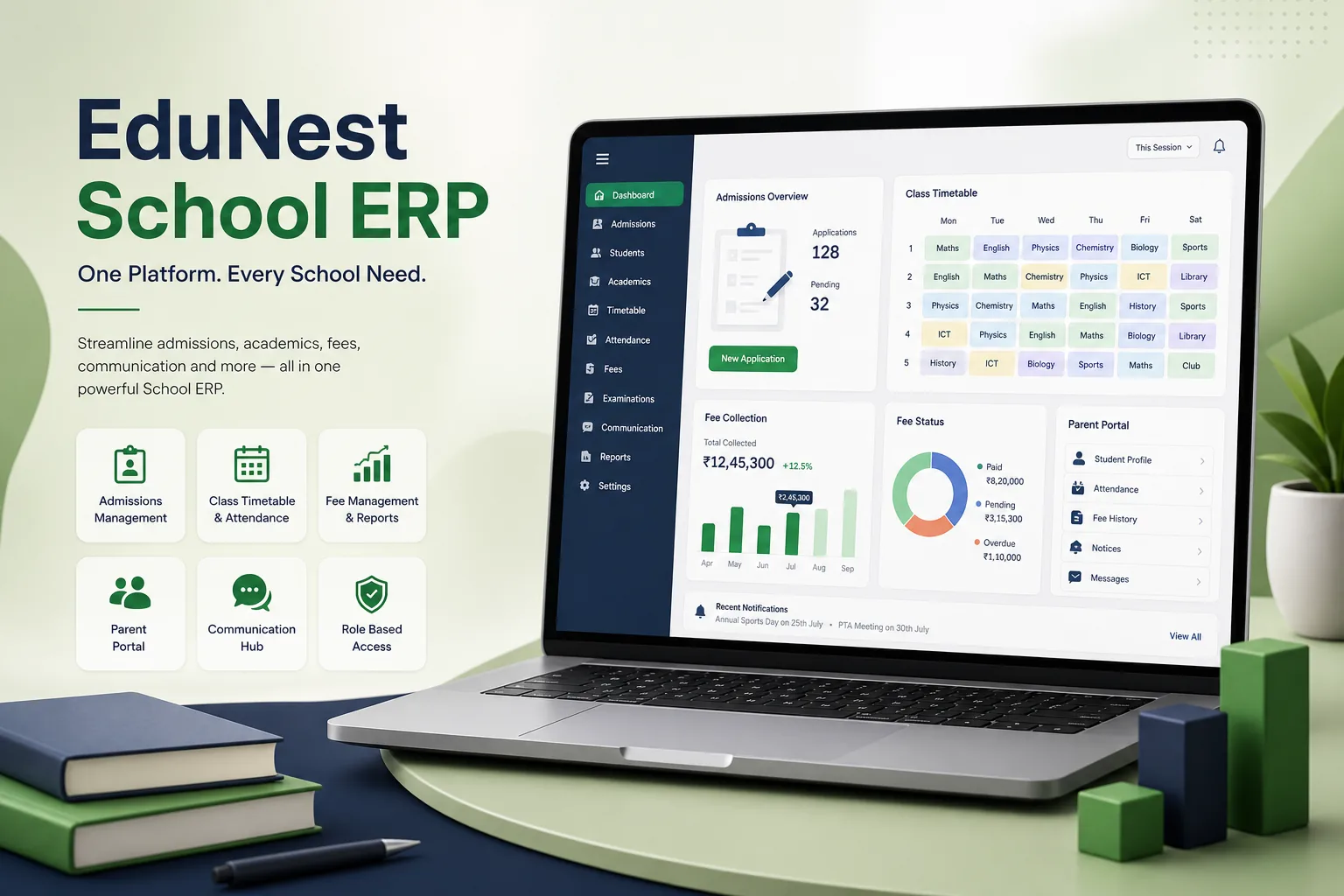
Project overview
We built a school ERP for a group of private schools operating several campuses. Admissions staff, accountants, timetable coordinators, teachers and principals all work in the same system, while parents use a portal to apply, pay fees, read notices, track attendance and download report cards.
The engagement covered process discovery at each campus, Laravel back end and Vue.js front end, MySQL data model, online payments integration, data migration from legacy records and training for staff. It is part of our education app development work for schools, colleges and education providers.
The client and the challenge
Each campus kept admissions in registers, fees in desktop accounting software and timetables in spreadsheets. Parents queued at the fee counter, receipts were handwritten, and reconciling concessions and late fees across campuses was a slow, manual job for the accounts team. Teachers marked attendance on paper, so parents learned about absences late.
The group wanted one platform with shared standards but campus-level control, online admissions and fee payment, clash-free timetables, and fast communication with parents. Because the system would hold children's personal data, the client also needed careful access controls, parental consent records and clear data retention rules. Staff varied widely in confidence with software, so screens had to be simple enough to use after a short training session.
Solution architecture & delivery
The Laravel back end models the group, campuses, academic years, classes and sections, with every student linked to guardians, enrolment history and a fee plan. Staff roles are scoped by campus, so a campus accountant sees only that campus while group finance sees everything. The Vue.js interface is built as reusable components shared between the staff ERP and the parent portal.
Admissions start with an online form in the portal. Applications move through document verification, assessment scheduling, offer and enrolment stages, and an accepted application becomes a student record without re-keying. Fee structures are defined per class with instalments, sibling and staff concessions, scholarships and late-fee rules. The system generates invoices each term, parents pay online through a payment gateway, and payment confirmations reconcile automatically against invoices. Counter payments are receipted in the same ledger, and exports feed the group's accounting system.
The timetable module takes teacher availability, subject periods per week and room constraints, and generates a draft timetable that coordinators adjust by drag and drop while the system blocks clashes. Teachers take attendance on a phone or tablet in class; absences trigger same-day notifications to parents. Exam marks are entered against grading schemes configured per board and class, producing report cards parents can download from the portal. Substitution planning shows which teachers are free when a colleague is absent, and changes are pushed to the affected class timetables.
Student data is protected with campus-scoped roles, activity logs on record views and edits, and consent records for photographs and communication. Retention settings archive records of students who have left. We reviewed the multi-campus design against our SaaS architecture checklist, and the platform sits within our wider ERP software development practice.
Key features we built
- Online admissions with document checks, assessments and offers
- Fee plans with instalments, concessions, scholarships and late fees
- Online and counter fee payments reconciled in one ledger
- Timetable generation with clash detection and drag-and-drop edits
- Mobile-friendly class attendance with same-day parent alerts
- Exams, grading schemes and downloadable report cards
- Parent portal for payments, notices, attendance and progress
- Campus-scoped roles, consent records and audit logs
How we delivered it
- Discovery. We spent time with admissions, accounts and academic coordinators at different campuses to map processes, fee rules and reporting needs, and agreed common standards across the group.
- UX and prototype. Prototypes of the fee counter, attendance screen and parent portal were tested with accountants, teachers and a group of parents.
- Build. Two-week sprints delivered admissions and fees ahead of the new academic year, followed by timetables, attendance, exams and the full parent portal.
- Migration and roll-out. Student, guardian and outstanding fee data were cleaned and migrated campus by campus, with one campus going live first before the rest followed.
- Support. Ongoing support covers academic year rollover, new fee rules, report card formats and staff training for new hires.
Technology choices
- Laravel — a productive PHP framework with built-in authentication, queues and scheduling for fee runs, notifications and reports.
- MySQL — a dependable relational database for students, fee ledgers and timetables that need strong consistency.
- Vue.js — lightweight reactive components shared by the staff ERP and parent portal, suited to form-heavy school workflows.
Outcomes
- Parents apply, pay fees and download receipts online instead of queueing at the counter
- Online and counter payments reconcile automatically against invoices
- Coordinators build clash-free timetables in the system rather than in spreadsheets
- Parents hear about absences on the same day
- Group leadership sees admissions and fee collection across campuses in one place
- Access to student data is scoped by campus and role and logged
FAQ
Can one school ERP serve several campuses with different fees?
Yes. The group sets shared standards, while each campus has its own classes, fee structures, concessions and staff roles. Group-level users see consolidated reports across campuses.
How does the parent portal handle fee payments?
Invoices are generated from each student's fee plan, parents pay through a payment gateway in the portal, and confirmations reconcile against the invoice automatically, with receipts available for download.
Can the ERP connect to online learning tools?
Yes. Class, student and teacher data can be shared with a learning platform so courses and assignments line up with timetables. Our LMS platform case study and e-learning software case study cover that side.
How much does a custom school ERP cost and how long does it take?
It depends on the modules needed, number of campuses, payment and accounting integrations and the state of legacy data. Use our SaaS development cost calculator for an indicative range, then we can plan modules around your academic calendar.
School ERP with Fees and Parent Portal screens
Build your next education product with Next Olive
Share your requirements — we will propose scope, timeline and stack within one business day.